
How to Choose the Right Accounting Workflow Management Software

Running an accounting practice is part deadline tracking, part client management, and part quality control. Somehow, it all happens at once. When your workflow is split up between apps, emails, and spreadsheets, the workload feels heavier and things slip.
Your best people spend too much time tracking work instead of doing it.
That’s where accounting workflow management software comes in. The right platform helps you turn repeatable work into repeatable results with clear steps, clear owners, and deadlines that don’t get buried in someone’s inbox.
And if you’re deciding between options like Mango and Karbon, here’s the simplest way to think about it: both help you manage workflow, but they take different paths to get there. Mango is built for firms that want an all-in-one system that feels intuitive fast, while Karbon is known for collaboration-first workflow management that can take more setup to master.
Next, we’ll break down what accounting workflow management software is used for and how to choose the best tool for your firm by comparing the features that matter most.
What Is Accounting Workflow Management Software?
Accounting workflow management software is the system your firm uses to plan, assign, track, and complete recurring work without reinventing the process every time.
At its best, it brings your core operations into one organized workflow, including:
- Complete workflow management: Optimize your workflows with one command center for tasks, clients, deadlines, documents, communication, and billing.
- Project and task management: A firm-wide view of who owns what, what’s next, and what’s due.
- Deadline tracking and visibility: A central place for due dates to “live” outside of inboxes.
- Time and billing tools: Manage time tracking, expenses, invoicing, and payments in the same place you manage your workflows.
- Client collaboration tools: Secure client portals, file sharing and storage, and eSignature tools to reduce back-and-forth.
- Document management: See what was requested, received, reviewed, and approved.
- Automation and reminders: Keep repetitive follow-ups on schedule with less manual effort.
- Reporting and insights: Spot bottlenecks and revenue patterns before they put deadlines, profits, or client satisfaction at risk.
With a platform like this in place, you stop managing work through scattered systems and start managing it through a process your whole team can see and follow.
The Bookkeepers’ Guide to Document Management
If your goal is to build a modern, streamlined, and profitable bookkeeping firm, you must invest in smart document management. This guide provides 13 pro tips for collecting, organizing, and securing the documents your firm needs.
How to Choose the Best Accounting Workflow Management Software
There are plenty of “best accounting software” lists out there, but the right choice depends on how your firm actually works. Before you commit to any platform (including Mango or Karbon), use these four steps to map how work should flow, identify where things break down today, and compare tools based on what your team will actually use.
1. Design and Standardize Your Workflow
If your workflow isn’t clearly defined, software won’t magically fix it. The best platforms make it easy to map your work into stages and repeat it consistently across staff, clients, and seasons.
Look for workflow management software that helps you:
- Define clear stages for recurring work so everyone knows what comes next. For billing and payment, this might look like: Invoice → Approval → Payment → Reconciliation.
- Build templates and checklists so work is consistent across clients. For a new client onboarding checklist, you could add: Engagement letter signed, Portal access granted, First data file uploaded, Initial review scheduled.
- Map hand-offs and dependencies so work doesn’t stall between steps. For example, once the client uploads their bank statements, the workflow automatically moves to reconciliation and assigns the task to the right team member.
When processes you repeat daily, weekly, or monthly become a visible and clear workflow, your team spends less time asking “What do I do now?” and more time finishing the work. That’s where accounting workflow management software starts paying off first.
2. Automate, Integrate, and Drive Efficiency
Once your workflow is clear, the next step is removing the friction. The right platform should reduce manual follow-ups, prevent duplicated effort, and connect the tools you already rely on.
Your workflow management tool should give you the ability to:
- Automate low-value tasks so your team saves time on routine work. Firms need basic automation that runs in the background, like automated document request emails, AI-powered document management, and reminder texts.
- Integrate your core systems so information flows without double entry. This might look like a portal upload automatically triggering the next task in the workflow (and notifying the right person).
- Spot capacity bottlenecks so you can balance workloads. Embedded capacity planning tools give you a weekly view of overdue tasks and workload by team member so you can reassign work before it piles up.
One firm used to manually email every client the same thing every month: “Please send your bank statements.” Once they automated this basic task, requests started going out on schedule, uploads came in faster, and staff time opened up.
Or consider an accounting firm owner who realized the “review” step always backed up because one senior accountant handled it. Adding a second reviewer and rebalancing work removed the bottleneck fast.
Efficiency is doing the same work with fewer delays, fewer follow-ups, and fewer surprises. If your workflow management tool can increase your efficiency with automation, you’re on the right track.
3. Ensure Quality, Consistency, and Compliance
Quality control and compliance can’t be an afterthought, especially when the firm is moving fast and managing higher work volumes. The right workflow platform helps you build quality checks into the work itself so they happen automatically, not only when someone remembers.
Your workflow management tool should help you:
- Standardize processes so the same steps happen in order every time. This might look like standardized closing or tax workflows that ensure every client hits the same milestones by the same dates.
- Build in sign-off checkpoints so work doesn’t move forward until verified. For example, the best tools allow you to set a required “Review by senior” step after journal entries or before deliverables go out the door.
- Maintain a clear audit trail and documentation history. This helps you quickly answer who did what, when, and what was approved. This might look like automatically logged status changes, approvals, and file history tied directly to the job.
This is where workflow management tools stop being a support that’s “nice to have” and become a true risk reducer. When quality steps and documentation are embedded into the process, you spend less time backtracking and more time delivering confident work you can back up with audit-ready records.
4. Continuous Improvement and Change Management
Your firm changes. Your clients change. Regulations change. Your workflow has to keep up without forcing everyone to relearn the process from scratch every season.
The best workflow platforms make continuous improvement simple. They help you adjust what’s not working, reinforce what is, and roll changes out in a way your team actually follows.
Your workflow management tool should make it easy to:
- Update templates and workflows quickly as your firm or regulations evolve. This might look like revising your onboarding template once and instantly applying it to every new client going forward.
- Track performance metrics so decisions are based on reality, not gut feel. Think about turnaround times, revenue and spending patterns, revisions, and capacity.
- Support adoption and accountability so process updates stick. From simple workflow notes and task-based triggers to training and how-tos built into the platform, the best accounting workflow management software helps your team follow the right steps by default.
The most scalable firms treat each workflow like a living system: review it, refine it, train the team, repeat. The right accounting workflow management software makes that cycle easier so your process improves over time instead of getting harder to manage as your client list grows.
Eliminate Wasted Time with Tax Workflows
Tax and accounting workflows provide an organized approach to managing projects and tax-related tasks, offering a structured sequence to ensure that no step is missed.
Key Options for Best Accounting Software: Mango vs. Karbon
If you’re comparing Mango and Karbon, both platforms can help you organize work and keep deadlines visible. The real difference is how they do it and which approach your team will actually adopt when things get busy.
Some teams prioritize simplicity and speed to adoption (so implementation doesn’t slow the firm down). Others prioritize deep collaboration features and are willing to invest more time into setup and training.
Most firms need strong visibility, automation, and reporting without adding complexity. The best choice is always the one your team will use consistently.
Mango tends to be a fit for firms that want an all-in-one system that feels intuitive quickly. Karbon is often a fit for firms that want a collaboration-first platform and are comfortable investing more time in setup and training.
Here’s what you should consider when you're reviewing your key options for the best accounting software.
Ease of Use and Onboarding Speed
When you’re rolling out a workflow tool, the learning curve matters. If the platform feels heavy, adoption slows, and your “new system” becomes one more place to check.
- Mango: Known for a short learning curve, with an intuitive interface, drag-and-drop workflows, and customizable dashboards.
- Karbon: Powerful, but users often report a steeper learning curve that can require more training upfront.
Workflow Automation and Task Management
Both tools support workflow management, but the day-to-day experience can feel different depending on how your firm runs recurring work.
- Mango: Supports customizable project and task workflows, automated reminders, and templates that help keep projects moving without extra admin work.
- Karbon: Includes task lists, automated reminders, and status tracking designed to keep deadlines and projects on track.
Team Collaboration and Communication
If your work involves multiple handoffs (and most accounting work does), internal collaboration tools can make or break workflow. Both platforms have features designed to keep busy accounting teams on track, but consider how that happens in each one.
- Mango: Built to keep work visible and organized in one place so teams can stay aligned on capacity, deadlines, next steps, and communication without chasing updates.
- Karbon: Known for shared task lists, real-time updates, and team notifications that support coordination.
Reporting, Insights, and Visibility
If you want to run a smoother practice, you need more than “tasks completed.” You need visibility into time, progress, and capacity.
- Mango: Recently upgraded Mango+ Reports deliver more detailed insights and analytics on revenue, time, project progress, and staff productivity.
- Karbon: Visibility into client interactions and progress tracking to support client service and internal oversight.
Time and Billing Tools
If you want workflow software to support your profitability, the strength and usability of the included time and billing features matter.
- Mango: Detailed billing features including time tracking for billable and non-billable time, invoice automation and templates, built-in payments, and expense management.
- Karbon: Time tracking and budget reporting features are available (depending on plan level).
Document Management and Client Experience
Accounting work is only as thorough as the documentation. The best tools don’t just store files, but actually help you keep them organized, trackable, and easy to find.
- Mango: Advanced document management with secure sharing, version control, and eSignatures (including knowledge-based authentication options), plus client portals, built-in collaboration tools, and email automation.
- Karbon: Includes client portals and client management features, with visibility into communication history and project status.
Available Integrations
Integrations reduce double entry and help your workflow move automatically by linking the work you do in other platforms seamlessly to your workflow management software.
- Mango: Integrates with tools like QuickBooks, Outlook, Google, and tax software (Ultratax Software, Lacerte, Drake Tax, and more) to streamline document management, client work, and billing.
- Karbon: Offers integrations, though some users report challenges with calendar synchronization and still rely on Outlook for daily calendar management.
Mango Practice Management Overview
Mango is all-in-one accounting practice management software built by accountants, for accountants. Mango brings your workflows, communication, and client-facing tasks into one organized system so your team stays aligned and your clients stay in the loop. It’s the easiest way to build a smoother, more scalable accounting firm.
Pros
- Short learning curve: User-friendly interface with drag-and-drop workflows and customizable dashboards.
- Detailed billing: Automatic time tracking, invoice templates, and expense management for accurate billing.
- Robust reporting and analytics: Reporting on hours, project progress, and staff productivity to support smarter decisions.
- Advanced document management: Secure file sharing, version control, and eSignatures with KBA options to keep documents organized and compliant.
- Seamless integration: Connects with tools like QuickBooks and Outlook to streamline billing and document management.
Cons
- Integration opportunities: Some users want additional sync options with tools like FreshBooks.
- Minor formatting issues: Some users would like more invoice formatting control, such as customizable fonts.
Pricing (Billed Annually)
- Basic Plan: $35/user/month; entry-level tools for essential workflow, file storage, invoicing, etc. Includes unlimited storage, time and billing, branded invoicing, reports, payments, and engagement letters.
- Plus Plan: $55/user/month. Adds project management tools, custom workflows, and reports. Includes everything in Basic, plus custom reports, project templates, customized workflows, project budgeting, automations, and reminders.
- Pro Plan: $69/user/month. Includes everything above plus advanced features like eSignatures, file-sharing, QuickBooks integration, email automation, and client portal.
- Free trial: No credit card required; 10-day trial gives you access to any plan tier for features like secure file-sharing, one-click eSignatures, client portal, core integrations, and more.
Mango also offers add-ons like MangoShare (file sharing & eSignature) and custom turnkey accounting websites so you can start lean and expand as your firm scales.
Karbon Practice Management Overview
Karbon is practice management software built to bring work, clients, planning, communication, and collaboration into one connected place. It’s a viable option for firms that want team visibility and collaborative workflows across clients and projects.
Pros
- Automated task management: Built-in task lists, automated reminders, and status tracking help keep deadlines and deliverables moving.
- Team collaboration: Shared task lists, real-time updates, and team notifications help everyone stay aligned.
- Client interaction visibility: Communication history and project progress live in one place for better service delivery.
- Customizable workflows: Create reusable templates for recurring work so you do less setup and more execution.
Cons
- Steep learning curve: Powerful features come with complexity; initial onboarding and training can take longer.
- Integration hurdles: Some users note limitations with calendar sync and still rely on external tools like Outlook for full calendar management.
Pricing (Billed Annually)
- Team Plan: $59/user/month (paid annually) includes essential workflow, collaboration tools, integrated email, task lists, time tracking, and billing & payments.
- Business Plan: $89/user/month (paid annually) adds workflow automation, automatic client reminders, task automators, and industry integrations to increase efficiency and visibility.
- Enterprise: Custom pricing; includes everything in Team and Business plus enterprise collaboration and security features, dedicated support, unlimited usage limits, and extended customization.
Karbon’s “free trial” offer is only available through booking a demo with the product team.
All plans include core practice management functionality such as workflow automation, shared communication, client portals, document management, and billing features tailored for accounting firms.
Which Workflow Management Tool Is Right for Your Firm?
Using the four steps above—design and standardize your workflow, automate and integrate, build in quality and compliance, and commit to continuous improvement—along with a detailed comparison of workflow management software features, plans, and pricing will point you to choose a tool that matches how your firm really operates.
Both Mango and Karbon are comprehensive practice management platforms designed for accounting firms. The best option is the one your team can use consistently without a steep learning curve.
Karbon can be a strong fit for firms that want a collaboration-first system and are comfortable investing more time in onboarding.
Mango is often the better fit for firms that want power through simplicity: a platform that feels intuitive fast, keeps work moving without constant follow-up, and helps the whole team stay aligned without adding complexity.
Make the Superior Choice with Mango Practice Management
The right accounting workflow management software should make your firm run smoother, not feel like one more project to manage. Mango brings workflows, communication, billing, documents, and client-facing tasks into one organized system so your team spends less time tracking work and more time finishing it.
If you’re serious about building a modern, profitable firm and you want the journey to feel simpler along the way, Mango is built for you.
“I’m impressed with Mango’s features and user experience. It’s hands down the best software I’ve used in my practice. It streamlines all aspects of my firm and ensures I get paid more quickly. Everything about Mango caters to the needs of accountants. It does the heavy lifting of running my firm so that I can focus on my clients.”
James L. Kent, CPA, PC
“...Over my 27-year career as a CPA, we’ve used 4 different time and billing systems. I was looking for a web-based application that was easy to use. Our previous desktop software was too cluttered with unimportant fields, verbose reports, and had occasional technical problems. I had been evaluating software for several months to replace our desktop system and was very pleased when I ran across Mango Billing. The extensive features and simplicity are spot on for my firm. The staff find the dashboards useful, and they love the time-tracking features. Finally, I can’t tell you how much I appreciate your personal attention to my needs and flexibility in helping me set up the system. Thank you!”
Stephen Scott, CPA, MIM
Scott & Co, CPA, P.C., St Louis, Missouri
Join the firms building a more efficient, more enjoyable accounting practice—make it Mango.
Simplify How You Run Your Business with Mango
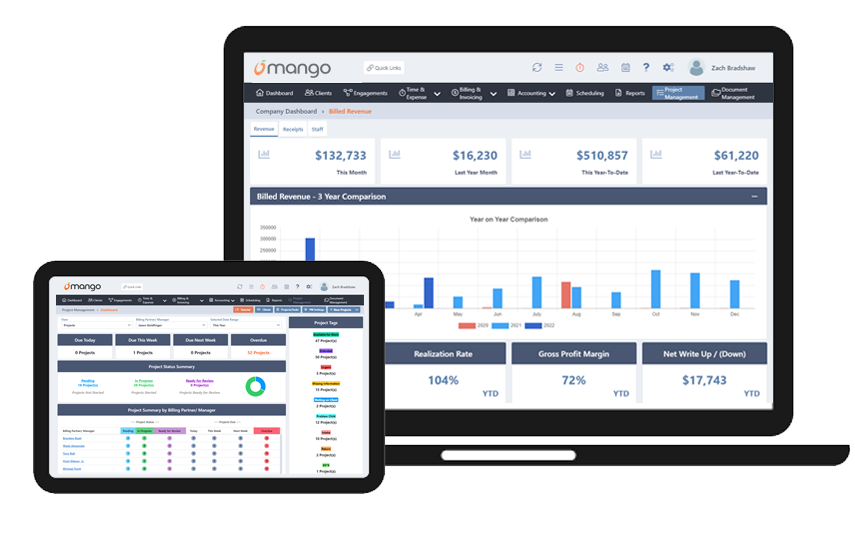
Mango Practice Management’s client-friendly suite of software tools makes it easy to manage firms of any size.
Latest Posts

QuickBooks Time Tracking for Accounting Firms: What Breaks at 10+ Staff (and What to Do About It)
Most firms eventually outgrow basic tools, but hitting 10+ staff usually exposes the limits of general-purpose timekeeping. Learn when your firm needs specialized time tracking software for accountants to manage complex rates, detailed client matters, and reporting.

The CAS Pricing Problem: Structuring Monthly Recurring Revenue Without Scope Creep
Client Advisory Services (CAS) can look profitable on paper while scope creep drains margins. Learn how to structure CAS pricing, build tiered service models, and manage change orders to protect your accounting firm’s monthly recurring revenue.

Why Tax Season Workflows Break (Even When You Have Software): A Bottleneck Audit for CPA Firms
Tax season puts immense pressure on operations, turning small friction points into serious delivery issues. Learn how to perform a post-season bottleneck audit to evaluate document collection, capacity planning, and handoffs, and discover the practical steps required to optimize your CPA firm workflow management before the next busy season hits.

When to Stop Billing Hourly: The Accounting Firm’s Transition Playbook to Value-Based Pricing
Moving away from hourly billing requires a clear strategy. Learn how to safely implement accounting firm value-based pricing with our 6-phase playbook, designed to protect your margins, manage staff capacity, and eliminate scope creep.

How to Say No: 7 Scripts to Protect Your Time, Team, and Clients
Unchecked client demands exhaust your staff and compress delivery margins. Learn how accountants can say no through structured, repeatable communication scripts.